

Guide · 29 October 2026 · 7 min read
AI receptionist for small businesses: reply to every lead in 5 minutes
When someone fills in your contact form, they rarely contact only you. They contact two or three businesses and usually book with whoever replies first with a clear, helpful answer. For a small business with no receptionist, that is hard: you are on a job, driving, with a client or asleep. An AI receptionist closes that gap by drafting a reply within minutes, every time, and leaving you in control of what gets sent.
What an AI receptionist does
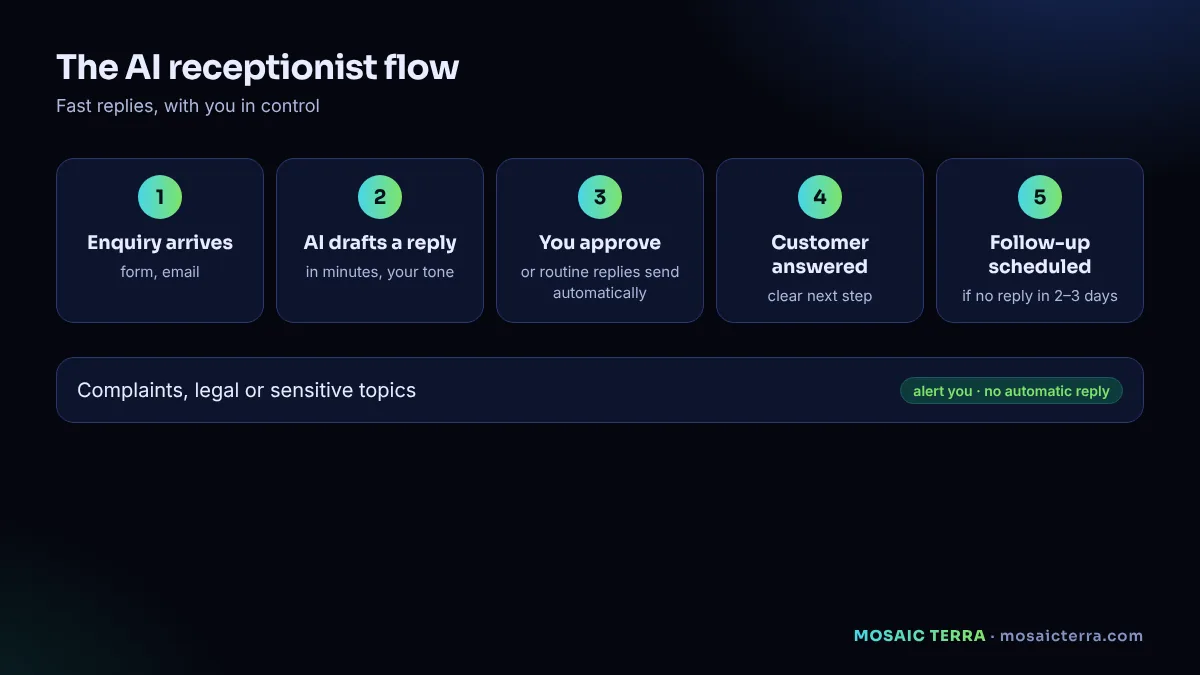
An AI receptionist is an AI agent with one job: look after new enquiries. It watches the places customers contact you, such as your website form, your email and sometimes messaging channels, and for each enquiry it:
- Reads the message and works out what the person wants.
- Checks your information: services, prices, availability, service area, FAQs.
- Drafts a friendly reply in your tone, with the next step (a quote, a call slot, a booking link).
- Either waits for your approval or sends routine replies automatically, depending on the rules you choose.
- Schedules a follow-up if the person does not respond.
- Logs everything in a simple daily summary on your phone.
Why five minutes matters
You do not need a research paper to know that speed wins enquiries; think about your own behaviour when you need a plumber, a photographer or a venue. The first business that gives a clear answer usually gets the conversation. A five-minute reply does three things:
- It catches the customer while they are still thinking about their problem.
- It shows you are organised, before they have met you.
- It stops them filling in the next business's form.
The goal is not to sound like a robot. It is to send a genuinely useful first answer quickly, then let you take over for the human part.
What a good AI reply looks like
A good first reply is short and specific. For example, for a bathroom fitter:
Hi Sarah, thanks for getting in touch about your bathroom in Witney. We fit full bathrooms from start to finish, including tiling and plumbing. To give you an accurate quote we usually visit for 30 minutes; we have slots on Thursday morning or Saturday at 10am. Would either suit you? If you have a couple of photos of the room, feel free to reply with them. Best, Tom
Notice what it does: confirms the request, answers the obvious question, offers a concrete next step and invites a reply. Notice what it does not do: invent prices, promise dates it cannot keep, or pretend to be something it is not.
Keep control: approval rules
You decide how much the receptionist does on its own. A sensible way to start:
| Type of enquiry | Week 1–2 | After testing |
|---|---|---|
| General questions (hours, area, services) | Draft for approval | Send automatically |
| Quote requests | Draft for approval | Draft for approval |
| Complaints or sensitive topics | Alert you, no reply | Alert you, no reply |
| Anything about payment disputes, legal issues or health | Alert you, no reply | Alert you, no reply |
| Spam | Ignore and log | Ignore and log |
Approvals can be as simple as a tap on your phone. The point is that the AI does the typing and you keep the judgement.
What you need to set one up
1. Your information in one place
Services, typical prices or "from" prices, service area, opening hours, booking options, and your ten most common questions with good answers. This becomes the receptionist's knowledge.
2. Your tone
Three or four real replies you have sent and liked. The receptionist learns your style from them.
3. Your channels
Which inboxes and forms it should watch. Start with one, usually your website form or main email.
4. Your rules
What it can send on its own, what needs approval and what should only alert you.
5. Accurate hours everywhere
If your website says one thing and Google says another, customers get confused. Keep your Google Business Profile hours up to date; our GBP guide shows you how.
Data protection and honesty
An AI receptionist handles personal data: names, emails, phone numbers and the content of messages. Treat it like a new member of staff:
- Mention in your privacy notice that you use automated tools to help reply to enquiries. The ICO's AI and data protection guidance is the reference.
- Reply only to people who contacted you. Sending unsolicited marketing is a different thing with its own rules; see the ICO's PECR email marketing guidance.
- Do not let the AI ask for bank details, passwords or ID documents.
- Be honest if asked: "replies are prepared with the help of an AI assistant and checked by our team" is fine and builds trust.
Common mistakes
- Letting it guess prices. Give it real price ranges or tell it to offer a quote visit instead.
- Too long replies. Four or five sentences is plenty for a first answer.
- No human handover. Make it easy for the customer to reach you directly.
- Forgetting follow-ups. Many enquiries go quiet; a polite follow-up two or three days later is often what wins the job.
- Switching off approvals too early. Test for at least two weeks first.
How it works with Mosaic Terra
Our Hire AI plans include setting up the receptionist role for you: we connect your form or inbox, load your information and tone, agree the approval rules and send you a daily report on your phone. The 1-agent plan at £89/month covers one clear job like this. If you also want help with social posts, research or reporting, the 5-agent plan at £179/month runs several roles together. Every plan includes a digital space in our live 3D city.
If you want to build something similar yourself, our guide to 7 n8n automations includes a simple enquiry-reply workflow.
Example rules for three types of business
Trades (plumber, electrician, builder)
- Reply to every enquiry with two visit slots from your calendar and a request for photos.
- Never quote a fixed price by email; offer a visit or a price range you have approved.
- Flag emergencies (leaks, no heating, safety) to your phone immediately.
Hospitality (café, restaurant, venue)
- Answer opening hours, menus, dietary questions and group bookings from your information.
- Send the booking link for standard tables; send group and event enquiries to you for approval.
- Always mention allergen information comes from the team, not the AI, and invite the customer to call.
Professional services (accountant, consultant, agency)
- Reply with a short summary of how you work and a link to book an introductory call.
- Never give advice on the customer's specific situation in the first reply.
- Route existing clients' messages to the right person instead of answering them.
Measuring whether it works
Track a few simple numbers before and after you switch the receptionist on:
- Average time to first reply during and outside opening hours.
- Share of enquiries that got a reply the same day.
- Share of enquiries that became a call, visit or booking.
- Minutes per day you spend on enquiries.
After a month, these numbers tell you whether to keep the setup as it is, change the rules or add more roles such as follow-ups and reporting. If reply time drops but conversions do not improve, look at the content of your replies and your offer, not just the speed.
Your first week with an AI receptionist
- Day 1: write your information sheet: services, prices or ranges, hours, service area, booking link and the questions customers ask most.
- Day 2: agree the rules: what it may answer, what it must pass to you and how it introduces itself.
- Day 3: test with ten realistic enquiries, including awkward ones, and correct the replies.
- Days 4–7: switch on with approvals, read every draft and refine the wording. Only reduce approvals once you are happy with the quality.
Be open with customers that the first reply is assisted by AI and that a person follows up. Honesty builds trust, and it is in line with the transparency the ICO expects when personal data is processed.
Reply to every enquiry in minutes
One AI agent, set up for you, with your approval rules: £89/month.
Frequently asked questions
What is an AI receptionist?
An AI agent that watches your enquiry channels, drafts helpful replies within minutes and sends them automatically or after your approval, depending on your rules.
Will customers know they are talking to AI?
You decide the wording, but being honest is best: replies can be prepared with AI and checked by your team.
Can an AI receptionist give prices?
Only the prices or ranges you give it. It should never invent prices; otherwise it offers a quote or a call.
How much does an AI receptionist cost?
With Mosaic Terra, one AI agent set up for you costs £89/month.
Is it GDPR compliant?
It can be, if you limit the data it uses, explain it in your privacy notice and only reply to people who contacted you.
Sources
- ICO: Guidance on AI and data protection
- ICO: How to comply with the PECR electronic mail marketing rules
- Google Business Profile Help: Edit your business hours
Prices on this page are Mosaic Terra's own prices in GBP. Third-party information was checked on 29 October 2026; always confirm current details on the official pages.