

Guide · 29 October 2026 · 7 min read
Google Business Profile in 15 minutes: local business guide

When someone searches "electrician near me" or "café in Witney", the first thing they usually see is not a website. It is a map with three businesses, their star ratings, opening hours and a "Call" button. Those come from Google Business Profiles. Setting one up is free, takes about 15 minutes, and for many local businesses it brings more enquiries than the website itself.
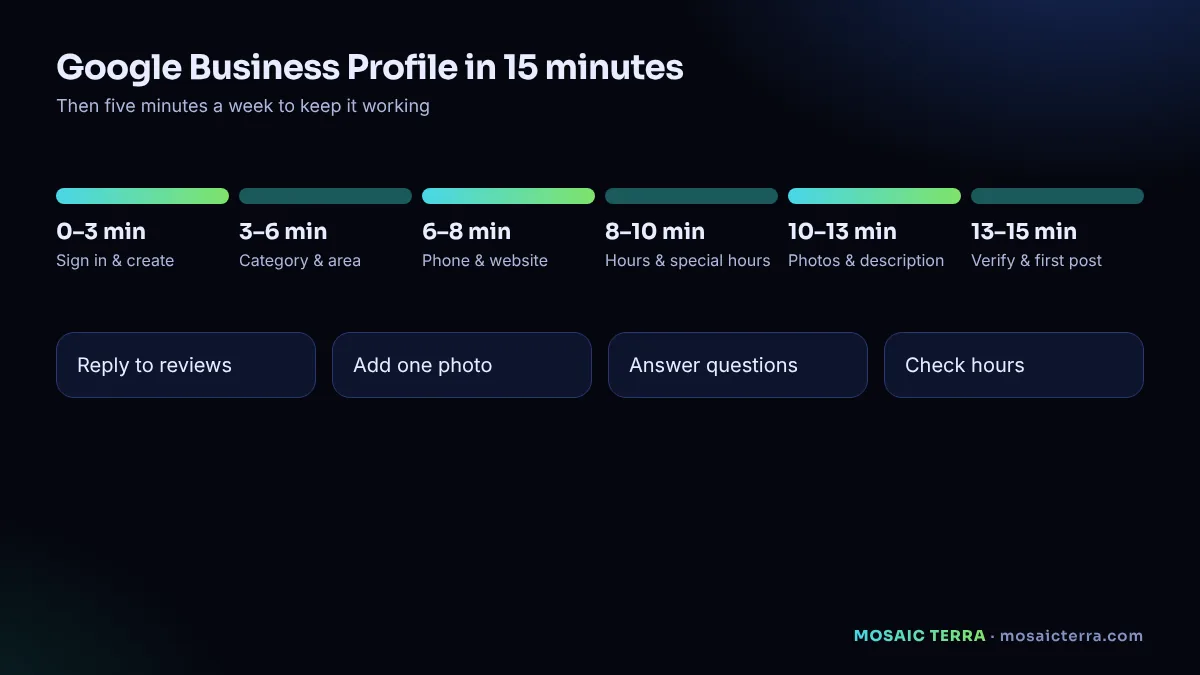
Minutes 0–3: sign in and create your profile
- Sign in to a Google Account. Ideally use one connected to your business email rather than a personal account.
- Go to business.google.com/create.
- Type your business name. If it appears in the suggestions, someone may already have created a listing; you can request ownership instead of creating a duplicate.
Use your real business name, exactly as customers see it on your sign, van or invoices. Google's guidelines for representing your business do not allow stuffing keywords or locations into the name, and doing so can get a profile suspended.
Minutes 3–6: category and location
Choose your primary category carefully
The primary category is one of the strongest signals for which searches you appear in. Pick the most specific one that describes your main service, for example "Bathroom remodeler" rather than "Contractor". You can add secondary categories later.
Shopfront or service area?
Google asks whether customers visit you at a location. If they do, add the address. If you go to customers (plumbers, cleaners, mobile hairdressers) and do not have a staffed shopfront, choose no and set a service area instead. Google's help page suggests keeping the area within about two hours' drive of your base (Google Business Profile Help). You can list up to 20 towns, postcodes or areas.
Minutes 6–8: contact details and website
- Add the phone number customers should call. Use the same number as on your website.
- Add your website address. If you do not have one yet, our guide to website costs explains your options; a fast, simple site makes your profile much more effective.
Consistency matters: your business name, address (if shown) and phone number should be identical on your profile, your website and other directories.
Minutes 8–10: opening hours
Add your regular hours. Then add special hours for upcoming bank holidays and the Christmas period. Wrong hours are one of the fastest ways to lose trust: a customer who drives to a closed shop rarely comes back. For the 2026 festive dates, see our Christmas marketing guide.
Minutes 10–13: photos and description
Photos
Upload real photos: your logo, the outside of your premises (if customers visit), the inside, your team and your work. Real, recent photos build more trust than stock images. Add new ones regularly.
Description
Write two or three plain sentences: what you do, for whom, where, and what makes you different. Avoid links, prices that change often and capital letters. For example:
Family-run bathroom fitters serving Witney, Carterton and Bampton. We design and fit complete bathrooms, including plumbing, tiling and electrics, with one team from start to finish. Free home visit and written quote.
Minutes 13–15: verify and publish your first post
Verification
Your profile only appears on Google after verification. Depending on your business, Google may offer verification by phone, email, video recording or, less often today, a postcard. Choose the option offered and follow the steps. If verification is pending, keep your details accurate and do not create a second profile; duplicates can cause suspension.
First post
Posts appear on your profile and show customers you are active. Start with a simple update: a recent job, a seasonal offer or your Christmas opening hours, with a photo and a button such as "Call" or "Learn more".
The five-minute weekly routine
| Task | Time | Why |
|---|---|---|
| Reply to new reviews | 2 minutes | Shows you care; future customers read replies |
| Add one new photo | 1 minute | Keeps the profile fresh and real |
| Check questions and messages | 1 minute | Unanswered questions look like a closed business |
| Check hours for the coming weeks | 1 minute | Avoids wasted trips and bad reviews |
Reviews: the honest way to get more
- Ask every customer after a completed job, with a direct link to your review form.
- Make it easy: a short message, one link, no login hassle.
- Reply to every review, good or bad, politely and briefly.
- Never write fake reviews, buy reviews or offer rewards for positive ones. It breaks Google's policies and UK consumer law, and it destroys trust when discovered.
An automated review request a day after each job is one of the simplest wins in our 7 n8n automations guide.
Common mistakes
- Keywords in the business name. "Smith Plumbing – Best Emergency Plumber Oxford" breaks the guidelines.
- Virtual office addresses for a shopfront profile. Use a service area instead if customers do not visit you.
- Duplicate profiles. One profile per business per location.
- Abandoned profiles. No photos for two years and unanswered questions.
- No website link. Your profile wins the click; your website wins the trust.
Profile plus website: the combination that works
Your Google Business Profile gets you seen; your website convinces. Every Mosaic Terra website package includes setting up your Google Business Profile properly, linked to a fast, mobile-ready site. For a new company, our online checklist puts both in the right order.
Choosing categories: examples
Categories decide which searches your profile can appear in, so they are worth a few extra minutes. Pick the most specific primary category, then add a small number of accurate secondary ones.
| Business | Primary category | Possible secondary categories |
|---|---|---|
| Bathroom fitter | Bathroom remodeler | Plumber, Tile contractor |
| Independent café | Coffee shop | Café, Breakfast restaurant |
| Mobile hairdresser | Hairdresser | Hair salon (only if you have premises) |
| Web design studio | Website designer | Internet marketing service |
Category names are chosen from Google's list, so use the closest match available in your profile.
Products and services sections
Many profiles can list services and products with short descriptions and prices. Use them. They help customers understand what you offer before they click, and they give Google more context about your business. Keep the names simple, match the wording on your website and update prices when they change.
Messages and questions
Depending on your business type and region, customers may be able to message you or ask public questions on your profile. If messaging is available and you turn it on, reply quickly or turn it off; unanswered messages look worse than no messaging at all. Check public questions weekly and answer them from the business account so the official answer appears.
Using your profile to measure local interest
Your profile includes performance information, such as how people found you and how many called, asked for directions or visited your website from the profile. Check it monthly. If calls and website visits from the profile grow after you add photos or posts, keep doing more of what works. If they drop, check your hours, categories and recent reviews first.
What to post through the year
- January: new-year availability and booking slots.
- Spring: seasonal services, refreshed photos of recent work.
- Summer: holiday opening hours, outdoor or seasonal offers.
- Autumn: preparation for winter and early Christmas bookings.
- December: festive hours, last order or booking dates, gift vouchers.
One short post with a real photo every week or two is enough for most small businesses. Consistency matters more than volume.
If your profile is suspended or edited by others
Anyone can suggest edits to a public profile, and Google sometimes applies them. Check your details regularly and correct anything wrong from your business account. If your profile is suspended, review the guidelines carefully, fix the cause, such as a name with added keywords or an ineligible address, and then follow Google's reinstatement process from your profile. Do not create a new profile to get around a suspension.
Finally, remember that your profile and your website work as a pair. Keep the same name, phone number, hours and services on both, update them on the same day when something changes, and link from each to the other. That consistency helps customers and search engines trust that your information is correct.
Want it set up properly for you?
Website plus Google Business Profile setup, domain, hosting and a year of care: £449 one-off, live within 3 days of receiving your content and approvals.
Frequently asked questions
Is Google Business Profile free?
Yes, creating and managing a Google Business Profile is free.
How long does Google Business Profile verification take?
It depends on the method Google offers; phone, email or video can be quick, a postcard takes longer. Your profile appears only after verification.
Can I have a profile without a shop?
Yes. Service-area businesses can hide their address and show the areas they serve instead.
Can I put keywords in my business name?
No. Google's guidelines require your real business name; adding keywords or locations can lead to suspension.
How do I add Christmas opening hours?
Use special hours in your profile for bank holidays and the festive period.
Sources
- Google Business Profile Help: Sign up for Business Profile
- Google Business Profile Help: Guidelines for representing your business on Google
- Google Business Profile Help: How to set special hours
Prices on this page are Mosaic Terra's own prices in GBP. Third-party information was checked on 29 October 2026; always confirm current details on the official pages.