
Guide · 9 November 2026 · 4 min read
Cookie Banner UK: What Small Businesses Need to Know
If you run a small business website, cookie banner uk rules are mainly about giving people a real choice before non-essential cookies load. In practice, that means a clear consent option, an equally clear reject option, and a way to stop analytics until the visitor agrees. The ICO is the main UK source to follow, and the safest approach is to keep it simple, honest and easy to use.
What a cookie banner is for
A cookie banner is not there to scare visitors or hide the website. It is there to ask for permission before you place cookies that are not strictly needed for the site to work. If you only use essential cookies, you may not need to ask in the same way, but most modern websites use analytics, embedded maps, chat tools or marketing pixels, so it is worth checking each tool carefully.
The ICO explains that consent must be freely given, specific, informed and unambiguous, and that people should have a genuine choice. You can read the ICO guidance here: ICO cookies and similar technologies guidance.
What your cookie banner should include
If you want your banner to be acceptable for a small business website, start with the basics:
- a clear explanation of what cookies are used for
- a visible accept button
- a visible reject button of the same weight as accept
- a link to your cookie policy or privacy policy
- a way to change choices later
Do not pre-tick boxes. Do not make people dig through settings just to refuse. Do not load analytics or ad cookies before consent if they need consent. If you use Google Analytics or similar tools, check how consent signals are handled in Google’s documentation on Consent Mode in Google Analytics.
Short answer on analytics
If your site tracks visits, forms or bookings, analytics usually needs consent unless it is configured in a way that truly avoids setting non-essential cookies before the visitor agrees. For most small businesses, the practical fix is simple: block analytics until consent is given, then let the tracking tag fire only after that choice.
How to set it up step by step
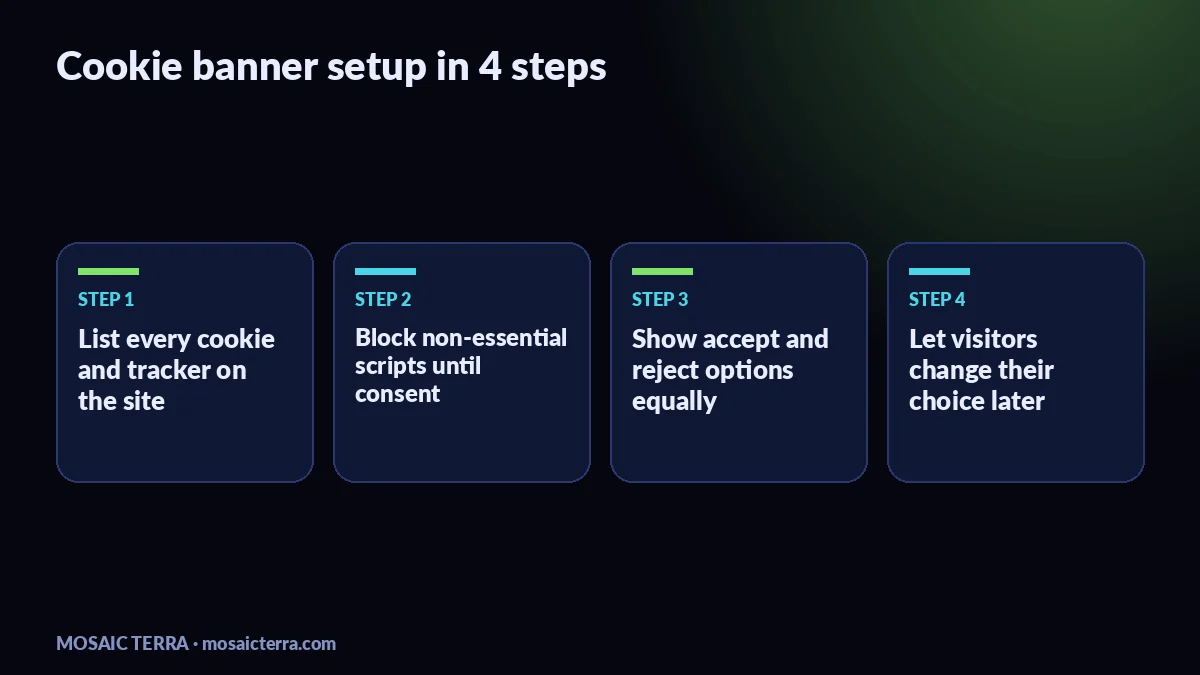
- List every cookie or tracking tool on your site, including analytics, maps, chat, booking and social embeds.
- Work out which ones are essential and which ones need consent.
- Write a short banner message in plain English.
- Add separate accept and reject buttons.
- Stop non-essential scripts until the visitor makes a choice.
- Save the choice and let people change it later.
- Check the banner on mobile as well as desktop.
If your website is built by us, we can plan this into the build from day one so the cookie setup is not bolted on at the end. See our Your Website, Done For You package, or browse all offers if you are comparing options.
If you prefer to handle the design yourself, our One Page Website Template, Mobile Friendly, 4 Colour Themes, Easy Edit, Instant Download can be a useful starting point for a simple brochure site.
Common mistakes to avoid
We see the same problems on small business sites again and again. The biggest one is treating consent like a formality. A banner that only offers Accept is not a real choice. Another common mistake is letting analytics fire before the visitor has agreed. A third is hiding the banner in tiny text or pushing the reject option out of sight.
It also helps to keep your cookie policy current. If you add a new plugin, chat widget or marketing tool later, your banner and policy may need updating too. That is one reason we like building websites with a simple content structure and a clean setup that is easier to maintain. If you are also working on your site speed, our guide Is your website too slow? A 10-minute PageSpeed check is a useful next read.
When to get help
If your website uses multiple tools, or you are not sure which scripts are loading before consent, it is usually worth getting help. That is especially true if you want the site to look good, stay fast and avoid broken forms. We build small business websites for UK owners who want something clear, tidy and practical, and we can help you shape the cookie setup as part of the build.
If you are also updating your local presence, our guide Google Business Profile in 15 minutes: local business guide pairs well with a cleaner website setup. And if you want a done-for-you site that is ready to launch quickly, you can request a quote.
Bottom line
A good cookie banner for a UK small business is simple: explain what is happening, give a real reject button, and keep analytics off until the visitor chooses. If you do those three things well, you are already far closer to a sensible, user-friendly setup than many sites we review.
Prefer it done for you?
Websites from £449 one-off, an AI Receptionist for £49/month, AI agents from £89/month, or your complete AI world from £899.
Frequently asked questions
Do I need a cookie banner on every UK website?
Not always. If your site only uses essential cookies, you may not need a full consent banner. But most business sites use analytics or third-party tools, so it is worth checking what loads before you decide.
Do I need a reject button on my cookie banner?
Yes, if you are asking for consent you should give people a clear way to reject non-essential cookies as easily as they can accept them.
Can I load Google Analytics before consent?
For a cautious setup, no. Block analytics until the visitor agrees, or use a consent setup that follows Google’s documentation and your legal advice.
Where should I keep my cookie policy?
Link it from the banner and from your privacy or footer area so visitors can find it easily at any time.
Sources
Prices on this page are Mosaic Terra's own prices in GBP. Third-party information was checked on 9 November 2026; always confirm current details on the official pages.