

Guide · 29 October 2026 · 7 min read
Just registered a limited company? Your online checklist

Congratulations: Companies House has registered your company and you have a certificate of incorporation. Now comes the part nobody explains in one place: getting the business ready to be found, trusted and paid online. This checklist covers what to do in your first day, week, month and three months, with the legal basics and the practical steps that bring in your first customers.
This guide is general information, not legal or tax advice. For your specific situation, speak to an accountant or check the GOV.UK pages linked below.
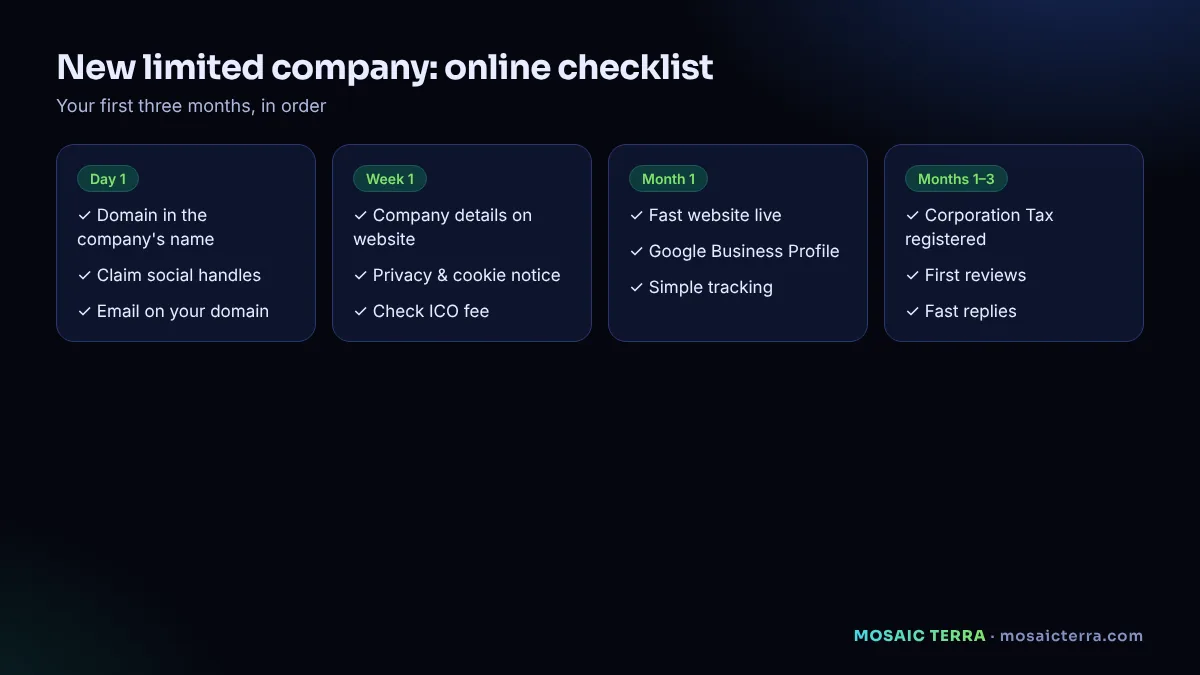
Day one: protect your name online
Register your domain
Check that your company name is available as a domain, ideally .co.uk or .com, and register it in the company's name. A domain is cheap; losing the one that matches your company name is expensive. If your exact name is taken, add your town or trade (for example smithjoinery-oxford.co.uk) rather than using hyphens and numbers that are hard to say on the phone.
Secure your social handles
Claim the same name on the two or three platforms your customers actually use. You do not need to post yet; you just want to stop someone else taking it.
Set up a professional email
Use an address on your own domain, such as hello@yourcompany.co.uk. It looks more trustworthy than a free webmail address and keeps company email separate from personal email.
Week one: the legal basics for your online presence
What your website must show
GOV.UK guidance says that on business letters, order forms and websites, a limited company must show its registered number, its registered office address, where it is registered (England and Wales, Scotland or Northern Ireland) and the fact that it is a limited company, usually by using its full name including "Limited" or "Ltd" (GOV.UK). The usual place is your website footer and a short "company information" page.
Privacy notice and cookies
If your website has a contact form or analytics, you are collecting personal data. You need a clear privacy notice explaining what you collect and why, and a cookie notice if you use non-essential cookies such as analytics.
Data protection fee
Most organisations that process personal data must pay the ICO data protection fee unless they are exempt. The ICO has a short self-assessment on its data protection fee page. For small organisations the lowest tier is £52 a year (£47 by direct debit) at the time of writing; check the ICO page for the current amount.
Corporation Tax
HMRC expects new companies to register for Corporation Tax within three months of starting to do business. GOV.UK's limited company setup guide explains the steps. Many company formation services do this for you; check whether yours did.
First month: become findable
Build a simple, fast website
You do not need a big site. For most new companies, five pages are enough: home, services, about, contact and company information, plus your privacy notice. What matters is that it:
- Says clearly what you do, for whom and where.
- Shows prices or "from" prices where you can.
- Has a contact form and phone number on every page.
- Loads fast on a phone (see our 10-minute speed check).
- Shows your legal company details in the footer.
If you want to compare the options, our guide to website costs in the UK and Wix or a web designer? will help.
Create your Google Business Profile
Even if you work from home or at customers' premises, a Google Business Profile helps local customers find you. You can hide your address and show a service area instead. It takes about 15 minutes; follow our step-by-step guide.
Set up basic tracking
Know where enquiries come from. A simple analytics tool on your website and a note of "how did you hear about us?" on your form are enough at the start.
First three months: get the first customers
- Tell your network. Former colleagues, suppliers, friends and local groups. Ask them to share, not to buy.
- Ask for reviews from day one. After every job, ask the customer for an honest Google review. Never write or buy reviews.
- Reply fast. New businesses win on responsiveness. An enquiry answered in minutes often beats a cheaper competitor who replies tomorrow. An AI receptionist can help.
- Publish useful content. Answer the questions your customers ask you on the phone, on your website. It helps Google and it saves you time.
- Contact businesses responsibly. If you sell to other companies, follow the ICO's rules for business-to-business marketing: say who you are and always offer an easy way to opt out.
Your printable checklist
| When | Task | Done? |
|---|---|---|
| Day 1 | Register domain in the company's name | ☐ |
| Day 1 | Claim social media names | ☐ |
| Day 1 | Set up email on your domain | ☐ |
| Week 1 | Company details ready for website and emails | ☐ |
| Week 1 | Privacy notice and cookie notice | ☐ |
| Week 1 | Check whether you need to pay the ICO fee | ☐ |
| Within 3 months | Register for Corporation Tax (if not already done) | ☐ |
| Month 1 | Website live, fast on mobile | ☐ |
| Month 1 | Google Business Profile verified | ☐ |
| Months 1–3 | First reviews, first content, fast replies | ☐ |
Mistakes new companies make online
- Domain registered by a friend or developer in their own name. Move it into the company's name now.
- A beautiful website with no contact details on mobile. Test on your own phone.
- Waiting for the perfect logo. Launch with something clean and improve later.
- Using a personal email for business. It looks less trustworthy and mixes records.
- Forgetting the legal details. Company number and registered office belong on your website.
Want it done in days, not weeks?
Our website package was designed for exactly this moment. For £449 one-off we design your site (classic or 3D), set up your domain and hosting for a year, make it mobile and Google-ready, add a contact form, set up your Google Business Profile and maintain it for a year. It is live within 3 days of receiving your content and approvals, and it includes a digital space in our live 3D city so your new company stands out from day one.
Choosing a business email setup
Most small companies choose between two well-known business email services. Both let you use your own domain, share calendars and add colleagues later. Whichever you pick, set up three things on day one: an email address on your domain for customers (for example hello@ or info@), two-factor authentication on every account, and a recovery method you control, such as a second email or a phone number that belongs to the company.
Add your company details to your email signature too: full company name, registered number, registered office and where the company is registered. It makes you look established and keeps your communications consistent with your website.
Your first website: what to write on each page
- Home: what you do, for whom and where, in one sentence; your main services; one clear button; proof such as photos or accreditations.
- Services: one short section per service, with what is included and a "from" price where possible.
- About: who you are, why you started, your experience. People buy from people.
- Contact: form, phone, email, service area or address, opening hours.
- Company information: the legal details listed above, plus your privacy notice.
Separate business and personal from the start
Open a business bank account in the company's name, use it for every company payment, and keep receipts digitally from the first day. Use company email for company accounts (domain registrar, hosting, social profiles) so access stays with the business if people change. These habits cost nothing now and save hours when you prepare accounts or bring in help.
Security basics for a new company
New companies are often targeted by scam emails that look official, such as fake invoices or requests for "registration fees". Check any unexpected payment request against official websites before paying, never share passwords or bank details by email, and turn on two-factor authentication everywhere. Store important logins in a password manager that the company controls.
Launch your new company online
Website, domain, hosting, Google profile and a year of care: £449 one-off.
Frequently asked questions
What must a limited company show on its website?
GOV.UK guidance says the registered number, registered office address, where it is registered and that it is a limited company, usually by showing the full name with Limited or Ltd.
Do I need to pay the ICO data protection fee?
Most organisations that process personal data must pay unless exempt. Use the ICO's self-assessment to check. The lowest tier is currently £52 a year (£47 by direct debit).
When should I register for Corporation Tax?
HMRC expects new companies to register within three months of starting to do business.
Do I need a website straight away?
You need to be findable. A simple, fast website and a Google Business Profile in your first month are enough to start winning enquiries.
Should my domain be in the company's name?
Yes. Register it to the company so it stays yours if you change providers.
Sources
- GOV.UK: Set up a private limited company
- GOV.UK: Running a limited company – signs, stationery and websites
- ICO: Data protection fee
Prices on this page are Mosaic Terra's own prices in GBP. Third-party information was checked on 29 October 2026; always confirm current details on the official pages.