
Guide · 12 November 2026 · 5 min read
What is n8n? A small business guide
What is n8n? It is a workflow automation tool that connects apps, moves information between them and triggers actions when something happens. For a small business, that can mean turning a web enquiry into a task, sending a follow-up email, or logging leads in a sheet without doing the same admin twice. n8n’s own docs explain how workflows are built from nodes and connected step by step, which makes it easier to see what is happening behind the scenes: docs.n8n.io.
What is n8n and why do small businesses use it?
We use n8n because it helps us join the dots between website forms, email, spreadsheets and AI prompts. That matters when you are busy, because missed replies and slow admin cost time. It is not magic and it is not a replacement for good process, but it is a practical way to automate repeat work without hiring someone for every small task. If you are comparing automation options, our guide to AI agents for small businesses explains where AI is the right layer and where a simple workflow is better.
n8n is especially useful when a task has a clear trigger, a clear set of steps and a clear result. For example: a form is submitted, the details are checked, the customer gets a reply, and your team gets a summary. That is the sort of work we build every week for clients who want less inbox chaos and faster follow-up.
Five real automations we run with n8n
Here are five workflows we actually use in our own studio and client setups:
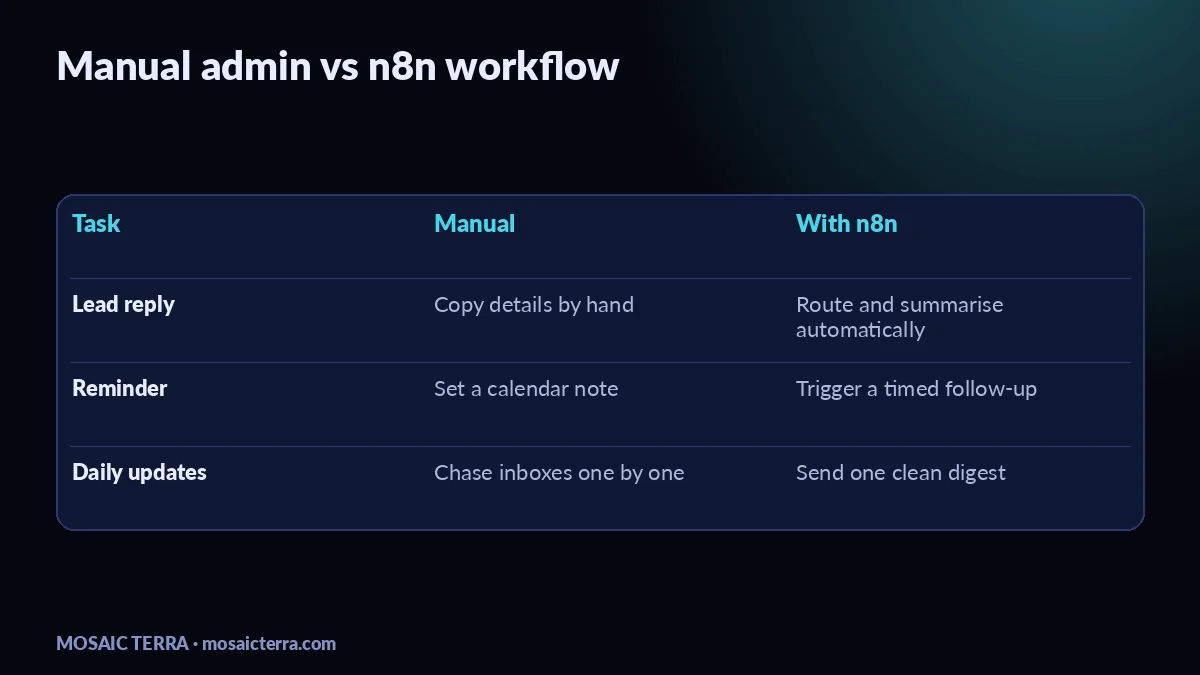
- Website lead routing — when someone sends an enquiry, n8n can format the message, send it to the right inbox and create a simple task so nothing gets lost.
- AI receptionist summaries — when a customer asks a question, the workflow can capture the message, pull in approved business details and send a daily summary to the owner. If you want a managed version of that idea, see our AI Receptionist.
- Quote request follow-up — a new quote request can trigger a polite follow-up email, a reminder after a set delay, and a note in your CRM or spreadsheet.
- Invoice reminder drafts — n8n can prepare reminder messages and set them aside for review, which is useful if you want a more careful process than blasting the same email to everyone. We cover the tone and timing in our invoice reminders guide.
- Christmas opening hours updates — one workflow can help you update your website copy, internal notes and customer messages in one go, which pairs nicely with our Christmas opening hours guide.
If you want a ready-made shortcut, our n8n Automation Bundle for Business is a useful DIY starting point before you build your own flows.
How n8n works in practice
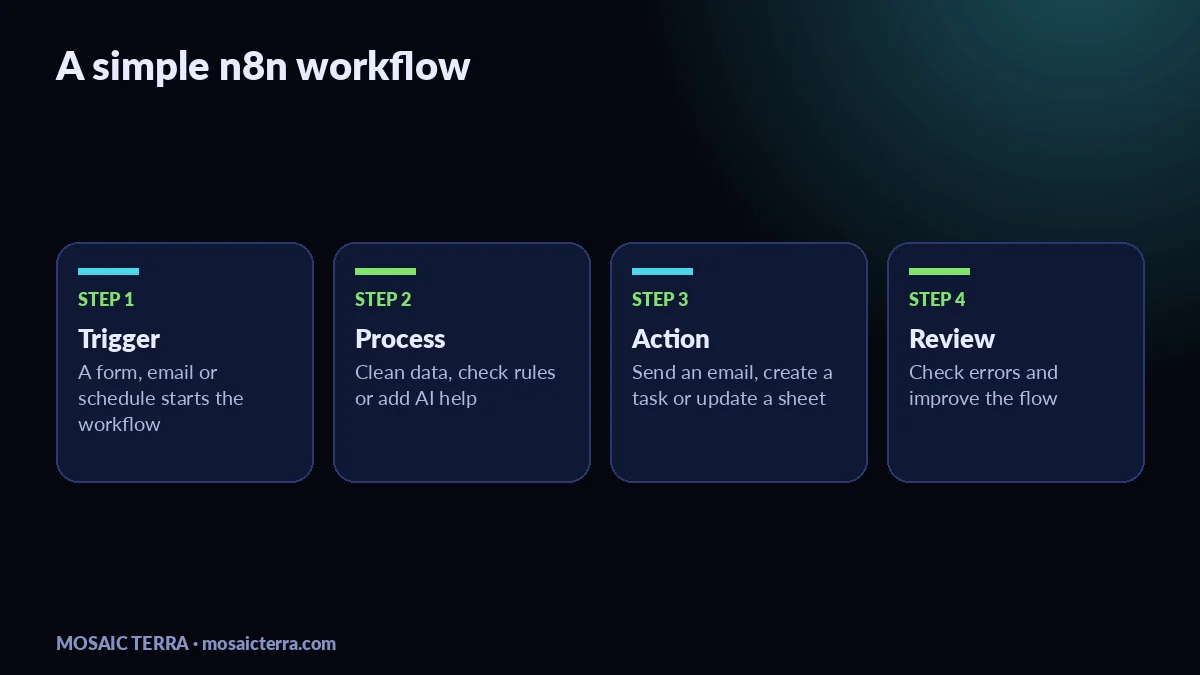
Most automations follow the same pattern: a trigger starts the workflow, one or more steps change or check the data, and a final action sends it somewhere useful. n8n’s documentation shows how to build these flows and connect services safely, which is why we always test a workflow before handing it over: docs.n8n.io.
- Pick the trigger — a form submission, new email, new row in a sheet, or a scheduled time.
- Clean the data — strip out junk, make names consistent and check required fields.
- Add the decision — for example, route a sales lead one way and a support issue another.
- Send the output — email the team, update a CRM, create a task or post a summary.
- Monitor and improve — review failures, edge cases and anything that still needs a human.
That is also why n8n fits well with a broader AI setup. If your process needs a human-approved reply, a custom workflow can prepare it, then leave the final send button to you. For more context, our guide to AI receptionist for small businesses shows how we think about customer replies and control.
Common mistakes to avoid
The biggest mistake is automating a bad process. If your follow-up is confusing, a workflow will only make the confusion faster. Start with one repeatable task, keep the first version simple and write down who owns it. Another common issue is forgetting data protection. If your workflow handles customer details, read the ICO’s guidance on the UK GDPR guidance and resources and only collect what you actually need.
It is also easy to overbuild. Many small businesses only need a few reliable workflows, not a complicated system with dozens of branches. That is why we often suggest starting with lead capture, reminders and summaries before moving on to more advanced AI steps. If you want a broader overview of what AI can do in the background, see our 7 n8n automations every small business can use.
When to get help
If you have more than one inbox, multiple team members or customer replies that need to be handled carefully, it can be worth getting help rather than trying to glue everything together yourself. Our AI 5 plan is a good fit when you want several automations managed as a set, and you can also ask for a quote if you want a custom setup. Check our offers page for the latest details.
The short answer to what is n8n is this: it is a flexible way to connect your tools, reduce manual admin and keep your customer process moving. If you start small and keep the rules clear, it can save a surprising amount of repetitive work without making your business feel robotic.
| Workflow | Trigger | Result |
|---|---|---|
| Lead routing | Website form submitted | Enquiry reaches the right inbox |
| Follow-up | Quote request received | Reminder sent at the right time |
| Summaries | New customer message | Owner gets a daily digest |
| Admin checks | New row or email | Data is cleaned and logged |
Prefer it done for you?
Websites from £449 one-off, an AI Receptionist for £49/month, AI agents from £89/month, or your complete AI world from £899.
Frequently asked questions
What is n8n used for?
It is used to connect apps and automate repeat tasks such as follow-ups, summaries, lead routing and reminders.
Is n8n only for developers?
No. It helps if you can think in steps, but many workflows can be built without heavy coding.
Can n8n work with AI?
Yes. You can use it to pass text to an AI step, then route the result into email, chat or a spreadsheet.
Is n8n suitable for small businesses?
Yes, especially if you want to save time on repetitive admin and keep customer replies more consistent.
Sources
Prices on this page are Mosaic Terra's own prices in GBP. Third-party information was checked on 12 November 2026; always confirm current details on the official pages.